Trending Eye Close Up Portrait Ai Photo Editing Prompt – Friends, now innovative photographs without any specific place and pricey setup are catching the eyes of people at social media. With a bit of stunning details, especially around the eyes, and some clever editing, a picture may be made to look totally different. The nice part is that you don’t have to invest hours of hard labour now to generate such graphics. You may quickly convert your images to this style with the help of AI programs. In this article we’ll walk you through the whole process, showing you how to generate gorgeous photographs like these in just a few simple steps.
Details Of Trending Eye Close-Up Portrait AI Photo Editing Prompt
This photo editing approach enhances the fine elements of the eyes giving a lovely and fascinating look. The black background, the gentle lighting and the cinematic effects really make the photograph remarkable. A good prompt may take a boring shot and turn it into an artistic portrait that will pop on social media.
Best Eye Close-Up Portrait AI Photo Editing Prompts for Boys
Photographs of boys with a focus on the look in their eyes can create a great visual impression. The right mix of powerful light, soft shadows and accurate detail gives an attractive and intriguing image. This style is perfect for the folks who love to make their photographs look trendy and unique.

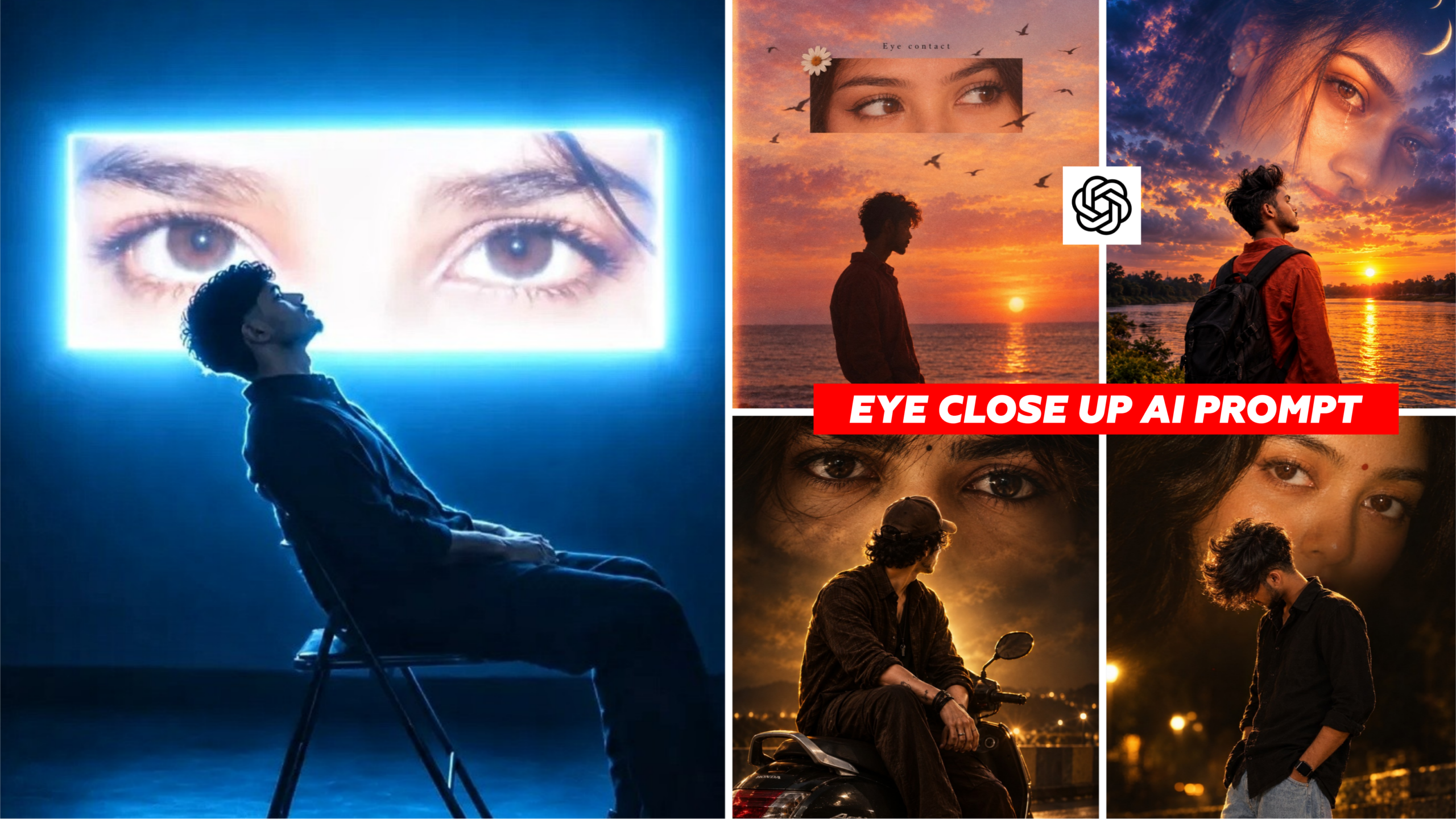
A young man with dark, curly hair seated on a dark metal folding chair in a pitch-black studio space, leaning back slightly and gazing upward. Behind him, a large horizontal glowing rectangular screen displays a close-up, high-detail shot of a woman’s brown eyes staring directly forward. Moody atmosphere illuminated primarily by intense cyan blue light, electric neon glowing screen edges, deep shadows, cinematic rim lighting, 8k resolution, photorealistic, dramatic composition, vertical 9:16 aspect ratio

Use the uploaded image only as the reference for the person's silhouette, body shape, hairstyle outline, and overall identity. Do NOT use the uploaded image for the eyes.Create a dreamy cinematic sunset collage with a nostalgic vintage aesthetic.Scene:A beautiful orange, golden, pink, and purple sunset over a calm ocean with soft reflections. Small birds flying naturally across the sky, creating depth and movement. Warm atmospheric haze and subtle film grain.Foreground:A soft black silhouette of the uploaded person standing sideways near the ocean, facing right, with a calm and emotional posture.Floating Eye Frame:Above the silhouette, place a clean horizontal rectangular crop featuring the ultra-realistic eyes of a beautiful young woman. Only her eyes should be visible. She has warm brown eyes, long natural eyelashes, defined eyebrows, soft eyeliner, and glowing skin. Her eyes are looking sideways, creating an emotional feeling of silent eye contact. Do not use the uploaded person's eyes.Design Elements:* Small white daisy flower attached to the top-left corner of the eye frame.* Minimal black text reading "Eye contact" above the eye frame.* Birds flying behind and in front of the eye frame for depth.* Clean editorial collage composition with plenty of negative space.Lighting:Golden hour sunlight, dreamy glow, soft bloom, volumetric lighting.Style:Editorial collage, Dreamcore, Vintage Kodak Portra 400 colors, cinematic, photorealistic, ultra detailed, HDR, premium poster design, 8K, Sony A7R V, 85mm lens, realistic skin textures, no AI artifacts, no watermark, vertical 4:5.
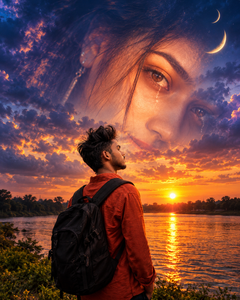
Ultra-realistic cinematic double-exposure portrait of a young man with a black backpack standing beside a river at golden sunset, viewed from behind. A giant translucent close-up of a beautiful woman's teary eyes blends into the dramatic blue-purple cloudy sky, with crescent moons above. Golden-orange reflections on the water, emotional romantic atmosphere, deep shadows, photorealistic DSLR quality, HDR, 4K details.
Aspect Ratio: 4:5 portrait.

Ultra-realistic cinematic night photo of a stylish young man wearing a black shirt, light blue baggy jeans, and a black smartwatch, head bowed with face hidden by voluminous hair. A giant close-up of a beautiful woman's expressive eyes and red bindi fills the dark background. Warm golden highlights, deep shadows, dramatic lighting, realistic DSLR photography, premium romantic mood, 4K quality, 4:5 portrait ratio. Preserve the reference face and pose.

Ultra-realistic cinematic night portrait of a young man sitting sideways on a black Honda Activa scooter, wearing a dark brown outfit and cap, facing away from the camera. A giant translucent close-up of his eyes fills the upper background, with messy hair strands across the forehead and a small black mole between the eyebrows. Warm golden backlighting, dark moody atmosphere, subtle glowing outline around the subject, realistic shadows, dramatic composition, photorealistic DSLR quality, sharp details, 4K HDR, vertical 4:5 aspect ratio. Preserve the original scooter, pose, outfit, and facial details from the reference image.
How To Create an Eye Close-Up Portrait Using ChatGPT
First, open up the chat. Create a new chat, name it the AI. Upload the photo from your gallery you want to alter. Then, copy the AI photo editing prompt you like, paste it in the chat box and send it. ChatGPT will create the picture as per your requirements. Look at the image as it is made and if you like it store it on your mobile device. To achieve better results, be careful to use a clean photo and provide an instruction in your prompt to keep the original facial traits.
Viral Giant Eyes Background AI Photo Editing Prompt
Friends, this cut style has a big striking close up of eyes behind the main subject adding a dramatic and ominous feel to the whole shot. Dark tones and dramatic lighting, as well as detailed facial work, help turn an average snapshot into something really special. This style is quite good for sharing creative and stylish images on social media.
How To Edit Eye Close-Up Portrait Photos with AI
To edit a photo with AI, first choose a high-quality image. Next, upload the photo to ChatGPT and ask it to give details like close-ups of the eyes, cinematic lighting, and backdrop effects. Ask for any changes you want, then stare at the image it spits forth. Don’t like the result? Tweak the prompt and try again.
Tips To Create a Realistic Eye Close-Up Portrait Using AI
Always use good quality source photographs (high resolution) for realistic and appealing graphics. In your prompt, explain the eyes, natural skin texture, proper lighting, surroundings, etc., in detail. Tell the AI to retain features of the original face so the person’s identity is preserved. And, try to limit the number of filters and effects you employ because using too many might make the final image look strange and amateurish.
Conclusion
With this picture editing technique, you can turn a plain image into something gorgeous and eye-catching. In this article, I provided the vital information in a simple method, so you won’t have any troubles while generating your images. All you have to do is choose a prompt you like, let ChatGPT create your image and then add your own artistic flair to make it one of a kind.