Motu Patlu AI Video Editing Prompt – Welcome to our new article. Friends, in today’s time, videos made with the help of AI are becoming increasingly popular on social media. Recently a new trend of Motu-Patlu AI Explore Video is being seen. In which people are presenting their village, city or any special place in a creative way with Motu-Patlu. Such videos are being liked a lot on Instagram Reels, Facebook and YouTube Shorts. If you too want to create a similar eye-catching AI video, then this article is for you. In this article, we will explain the entire process in simple language, so that anyone can create their own video even without much technical knowledge. So read this article till the end, so that you too can easily create your own amazing AI video.
What Is Motu Patlu AI Video Editing Prompt?
‘Motu Patlu AI Video Prompt’ is a detailed text instruction. Which is used to create animated videos of city tours using AI video generation tools. This refers to the style of the video, camera movement, atmosphere, lighting, and storytelling. So that interesting travel content can be created in cartoon style. These prompts are popular among content creators who want to create creative and entertaining AI videos on fun and exciting themes related to such characters. So you must read this article till the end, in this article I have explained all the editing processes step by step.
Motu Patlu AI Video Editing Process?
The entire process of generating this AI film is quite simple and is fully dependent on AI technologies. This video was made totally with AI and then edited into one video. After the video is ready, you can also customise dialogues of the AI character as you like. This means that the character will only say what you want him to say. That’s why AI video editing is gaining popular with content creators nowadays. In this lesson, we’ll go through how to construct an AI Image step by step, how to produce an AI Video, and how to customise the voice and language of your character. So you can also generate viral grade AI videos simply.
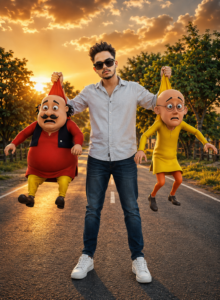
A cinematic ultra-realistic 3D scene of a stylish young man wearing black sunglasses, a light grey button-up shirt with rolled sleeves, dark blue jeans, and white sneakers, standing confidently in the middle of an empty countryside road during a breathtaking golden sunset. The man is holding two famous cartoon characters by the backs of their shirts—Motu on the left wearing a red kurta, black vest, and yellow pants, and Patlu on the right wearing a bright yellow kurta and orange leggings. Both characters have surprised, worried facial expressions with their legs dangling naturally. Dramatic golden-hour lighting, warm orange sky filled with soft clouds, lush green trees on both sides, shallow depth of field, ultra-detailed textures, realistic shadows, perfect anatomy, seamless integration of realistic human and stylized 3D cartoon characters, volumetric lighting, HDR, photorealistic, 8K, DSLR quality, sharp focus, masterpiece composition, vibrant colors, highly detailed background, cinematic color grading, premium portrait photography, realistic road reflections, soft bokeh.
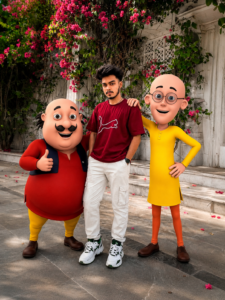
Create a realistic high-quality photo of the uploaded person standing outdoors with two cheerful cartoon characters inspired by a funny Indian animated duo. Keep the person's face, hairstyle, beard, body shape, pose, clothes (maroon Puma T-shirt, white cargo pants, white sneakers, black smartwatch), and expression exactly the same as in the uploaded photo. Place the cartoon characters on both sides of the person in a friendly pose, smiling and looking at the camera. One character gives a thumbs-up while the other places a hand on the person's shoulder. Background: luxurious white marble building covered with vibrant pink bougainvillea flowers and green vines, bright natural daylight, cinematic lighting, ultra-realistic environment, highly detailed textures, soft shadows, vibrant colors, DSLR photography, 35mm lens, shallow depth of field, HDR, 8K quality, sharp focus, realistic skin tones, premium color grading. The composition should look like a real photo with perfectly blended cartoon characters. Vertical portrait, 9:16 aspect ratio.
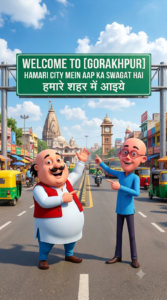
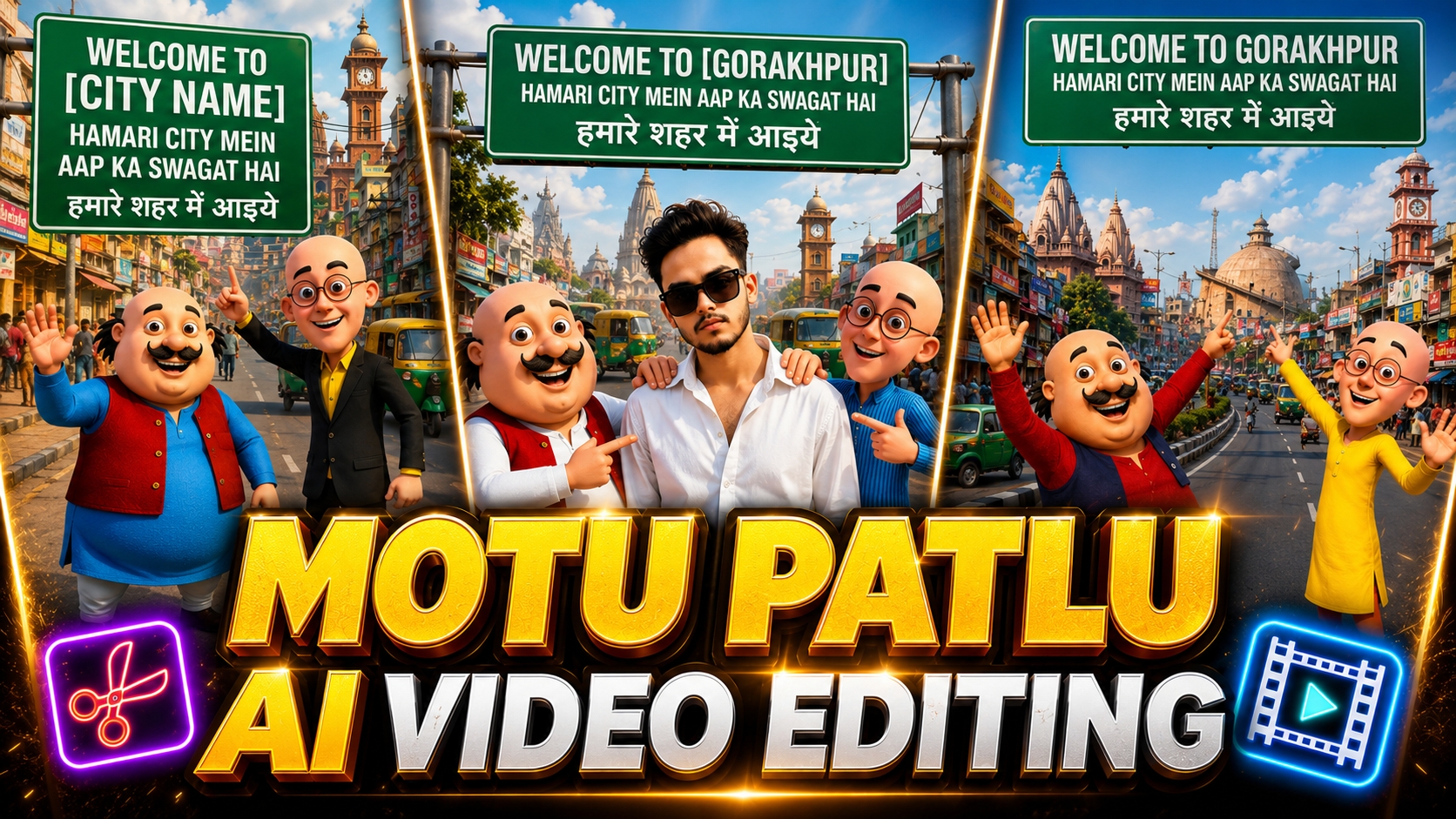
Ultra-realistic 3D cartoon scene featuring the original Motu and Patlu characters with their iconic faces, outfits, body proportions, and expressions unchanged. They are standing in the middle of a wide Indian city road, smiling, waving at the camera, and pointing toward a giant green highway welcome sign. The sign reads: "WELCOME TO [CITY NAME]" in large bold white letters, below it "HAMARI CITY MEIN AAP KA SWAGAT HAI", and in Hindi "हमारे शहर में आइये". The background showcases famous landmarks, temples, clock towers, busy markets, colorful shops, vehicles, auto-rickshaws, and local architecture representing [CITY NAME]. Bright sunny day, blue sky with fluffy clouds, vibrant colors, cinematic composition, highly detailed, photorealistic environment, 8K quality, Pixar-style 3D rendering, sharp focus, realistic lighting, natural shadows. Strict character consistency: Motu and Patlu's faces, hairstyle, clothing, proportions, and expressions must remain exactly like the original cartoon, with no changes or distortions. Vertical 9:16 composition.
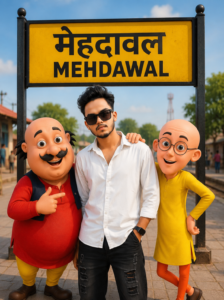
Create a high-quality 9:16 realistic cinematic poster using the uploaded photo as the face reference. Keep the person's face, hairstyle, beard, sunglasses, skin tone, expression, and body proportions exactly the same without any changes. The person is standing confidently between Motu (red outfit) and Patlu (yellow outfit) on a busy road in Mehdawal, Uttar Pradesh, India. Motu and Patlu are smiling naturally with their original cartoon appearance and proportions. The uploaded person's identity must remain perfectly preserved. At the top of the image, place a large realistic green highway welcome board with bold white text: WELCOME TO MEHDAWAL HAMARI CITY MEIN AAP KA SWAGAT HAI हमारे शहर में आपका स्वागत है The word "MEHDAWAL" must be spelled perfectly in large capital letters. Background: busy Indian city road, shops, trees, vehicles, people walking, realistic lighting, golden hour sunlight, vibrant colors, ultra-detailed environment. Style: hyper-realistic, cinematic, 8K UHD, DSLR quality, sharp focus, natural skin texture, realistic shadows, depth of field, vibrant colors, premium poster design, highly detailed, professional composition. Important: – Do not change the uploaded person's face. – Keep Motu and Patlu's original look. – No extra people. – No text spelling mistakes. – Ultra HD, 9:16 vertical poster.
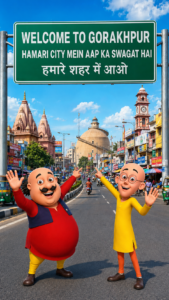
Create a high-quality 9:16 vertical poster featuring Motu and Patlu standing on a busy city road in Gorakhpur, India. A large realistic green highway welcome board dominates the upper part of the image with perfectly spelled text: WELCOME TO GORAKHPUR HAMARI CITY MEIN AAP KA SWAGAT HAI हमारे शहर में आओ The word “GORAKHPUR” must be spelled correctly and clearly in large bold white letters. Motu (red outfit) and Patlu (yellow outfit) are smiling and pointing toward the welcome board. The background shows a lively Gorakhpur city scene with a central clock tower, market buildings, auto-rickshaws, shops, road signs, and local landmarks. Bright blue sky, vibrant colors, clean typography, realistic city atmosphere, ultra-detailed 3D cartoon style, cinematic lighting, sharp focus, professional tourism poster design, highly detailed textures, depth of field, 8K quality, family-friendly, colorful and cheerful mood. Make the welcome board fully visible and readable. Ensure all text is correctly spelled: “WELCOME TO GORAKHPUR” “HAMARI CITY MEIN AAP KA SWAGAT HAI” “हमारे शहर में आओ” No spelling mistakes, no distorted text, no cropped board, no blurry letters, no extra random words.
Video Prompt-
Motu says: "Mehdawal mein aap sabka swagat hai!" Patlu says: "Chaliye, hum aapko apna shahar ghumate hain!" Include synchronized character voices, natural lip sync, ambient city traffic, birds chirping, and realistic environmental sounds.
Create a 30-second ultra-realistic 3D animated selfie vlog using the uploaded image as the exact reference. Keep Motu, Patlu, their clothes, expressions, and the highway background unchanged. Add natural lip-sync, blinking, facial expressions, hand gestures, and slight handheld camera movement. Motu smiles, waves, and says:”हेलो दोस्तों मैं मोटू हूँ। आज मैं Gorakhpur घूमने आया हूँ। यहाँ का माहौल बहुत बढ़िया है। आज मैं Gorakhpur का फेमस नौका विहार घूमुंगा Now Patlu speaks.”दोस्तों, यह शहर बहुत ही सुंदर है। अगर मौका मिले, तो यहाँ ज़रूर आइए!” Add realistic highway ambience, passing vehicles, birds, light wind, cinematic lighting, smooth animation, 4K, vertical 9:16.
How To Generate This AI Video?
Now we’ll learn how to make AI pictures. Here we gave you prompts for AI images and videos. To make a photo, copy the photo prompt and open ChatGPT. Then copy the prompt. In the prompt Gorakhpur is given as an example. Simply replace it with the name of your own city or hamlet and you’ll have an AI video that’s personalised for you. Click Generate now. Your Motu Patlu AI image will be ready in few seconds. Now, to make your own photo with Motu Patlu, open ChatGPT again and click on the (+) icon to upload a clear photo of yourself. Then, repeat the same prompt and click Send. Your photo with Motu Patlu will be ready in AI style in no time. Now that your image is ready, you can use the step-by-step guide below to transform it into an AI video.
How To Edit This Video Step By Step
- First of all open YT Create app on your mobile.
- After opening, tap on Generate Video.
- Now paste the video into the prompt box provided. If necessary, you can change the name of your city or village to your city name.
- Then upload your Motu Patlu AI image by tapping on the upload box below and click on the generate button.
- The AI will create the video as per your prompt in no time.
- Once the video is ready, watch it completely. If you need to make any changes, edit the prompt and re-generate it.
- When the video is ready as per your choice, export it and save it in your gallery.
Conclusion
In this post, we have discussed how to create Motu Patlu AI Video in easy stages. In this article we will allow you to make fantastic AI films with the name of any of your cities or villages, effortlessly. Hope this information has been useful to you. Now, follow the steps below and try to create your own viral AI video with Motu Patlu. And do give it to your friend also so he may also create his own video and make it viral.