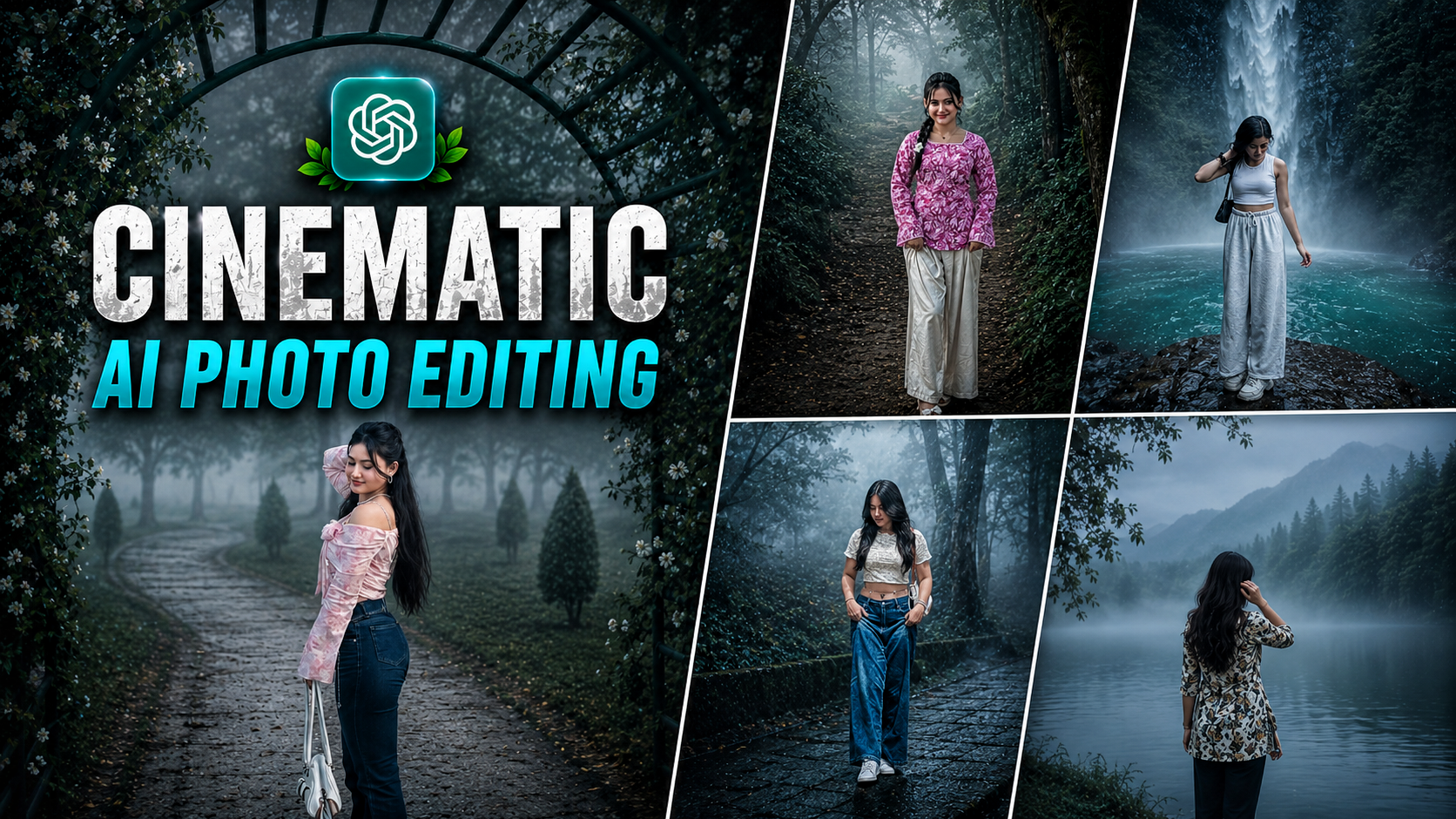
Cinematic Ai Photo Editing Google Gemini Prompts 2026 – Welcome to our website. Friends, nowadays a new trend is becoming increasingly viral on social media. People are creating unique and eye-catching images, which you can create in one click with the help of AI. This editing style is trending everywhere and people are very excited to make it. If you also want to create this photo, then you can easily create such a photo with the help of AI tools. The photos you create will look completely professional and realistic, which can increase the chances of them going viral on social media. In this article, I will explain the entire process to you in an easy way so that you can learn this editing style without any hassle. To learn editing, keep reading the article.
Details Of Cinematic Ai Photo Editing Google Gemini Prompts 2026
Nowadays this photo editing style is becoming viral very fast on Instagram. Everyone, boys and girls, is trying it out. Let’s find out what special things you’ll find in this edit. Friends, first of all there are three to four different layers in the final photo. In which small versions of your own photo are visible in different poses. This creates a collage-like look where each small photo shows a different expression. In one, you’re smiling. So they appear to be looking in a different direction. Furthermore, such color effects are added to the photo. This gives it a cinematic and slightly retro look, and also adds a music icon. The name of a song is written on it, making the photo even more attractive. Some floral design elements are also added to this, giving the photo a classic and aesthetic feel. All these things together make this editing style so trending and special. In this article, I’ll explain the entire photo editing process, so please read it carefully and you too can create this viral AI photo.
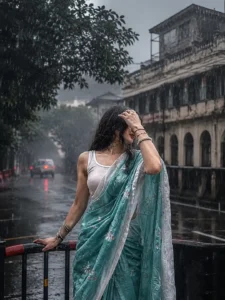
A cinematic monsoon street portrait of a beautiful young Indian woman standing on a rain-soaked road in an old heritage city. She is wearing a wet pastel turquoise-blue floral saree with a white sleeveless blouse, her long black hair drenched from the heavy rain. She gently covers part of her face with one hand while resting the other hand on a black-and-red roadside barrier. The background features vintage colonial-style buildings, lush green trees, wet asphalt reflecting lights, distant cars with glowing red taillights, and a dark overcast sky. Heavy rainfall, realistic water droplets, moody atmosphere, soft natural lighting, shallow depth of field, ultra-realistic skin texture, cinematic composition, 85mm lens, f/1.8, HDR, 8K, highly detailed, photorealistic, dramatic monsoon aesthetic, muted color grading, premium editorial photography.
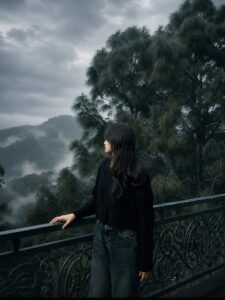
"Apply a cinematic dark forest color grade with cool emerald green and deep teal tones. Increase atmospheric fog and mist, lower overall exposure slightly, reduce highlights, deepen blacks while preserving shadow details. Desaturate warm colors except for natural skin tones. Add soft matte contrast, subtle blue-gray haze, rich forest greens, and muted earthy browns. Enhance depth with soft diffusion, volumetric light through the trees, gentle vignetting, realistic HDR, clean skin tones, premium travel aesthetic, ultra-realistic, high dynamic range, crisp details, DSLR quality, 35mmlens, moody rainforest ambiance, 8K."image ratio is 4:5
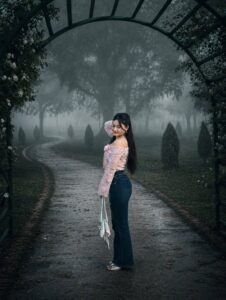
Transform this image into a breathtaking ultra-realistic foggy forest masterpiece. Add dense natural white fog covering the entire environment, creating a mysterious and cinematic atmosphere. Apply rich forest-inspired color grading with deep emerald green, dark teal, moss green, and earthy brown tones. Enhance the trees, foliage, and background elements to resemble a lush enchanted forest hidden in the mist. Introduce soft volumetric light rays subtly penetrating through the fog, creating depth and realism. Increase overall image quality to ultra-high definition 4K resolution with razor-sharp details, HDR enhancement, realistic textures, balanced contrast, and natural color harmony. Improve shadows, highlights, and dynamic range while maintaining a realistic appearance. Add a moody woodland aesthetic, drermy fog layers, atmospheric perspective, and professional cinemate photography grading. The final result should look like a premium DsLR forest photograph captured during a cold misty
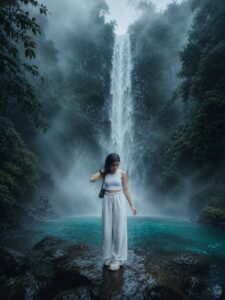
Refer to the uploaded user photo for the person's face and appearance. Place this exact person inside a breathtaking cinematic masterwork scenery of a majestic waterfall cascading down a steep, moss-covered rocky cliff into a crystal-clear, vibrant turquoise pool. The entire environment must be filled with heavy, dense, and thick mystical fog and swirling mist. The lighting must be highly dramatic and atmospheric; the cool blue, cyan, and green colors of the foggy environment must realistically reflect onto the person's skin and face, blending their skin tone perfectly with the background. Cinematic look, photorealistic, 8k resolution, ultra-detailed texture, epic scale, enchanting mood. –ar 4:5 ratio
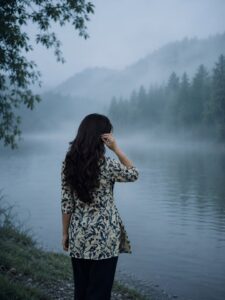
Ultra realistic cinematic monsoon portrait of a young woman standing with her back facing the camera beside a calm misty lake, long wavy black hair flowing naturally, wearing a cream floral kurti with dark pants, gently touching her hair, surrounded by dense pine forest and fog-covered mountains in the background. Early morning blue-hour atmosphere, soft diffused natural light, cold teal-blue color grading, dreamy fog layers floating above the water, peaceful mood, shallow depth of field, ultra detailed hair texture, realistic fabric details, volumetric mist, cinematic composition, moody forest environment, high dynamic range, professional photography, 85mm lens, f/1.8, sharp focus, ultra realistic, 8K, masterpiece, photorealistic, atmospheric perspective, nature aesthetic, Instagram travel photography style.
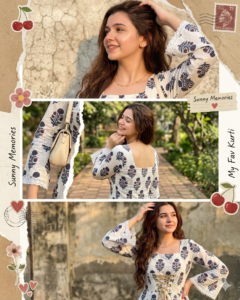
Use only the uploaded face (identical in all panels).Create an ultra-realistic 3-panel vertical collage (top/middle/bottom) of the same young woman.Outfit: White floral cotton kurti, square neckline (front/back), fited bodice with corset lace-up, long bell sleeves with lace trim. Minimal gold jewelry t shoulder handbag. Same hair (long, slightly voluminous) and styling in all panels. Top:Close-up side pose, one arm raised, soft confident expression, warm lighting, textured background.Middle: Back pose, hand under chin, eyes closed smiling, natural daylight, outdoor garden. Bottom: Mid-shot front pose, hand on head, looking sideways, warm sunlight, slightly grainy backdrop. Style: Ultra-realistic scrapbook collage with torn paper edges, vintage textures, stickers (cherries/flowers), stamps, handwritten notes. Cohesive across all pannel.
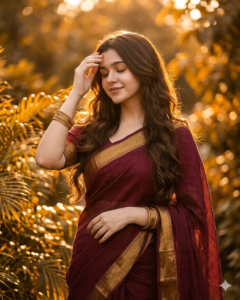
A cinematic, high-resolution portrait of a young woman standing amidst lush green foliage during the golden hour. She is wearing a deep maroon linen saree with a thick antique gold border and matching gold bangles. Her long, dark brown hair is styled in soft waves, glowing from a strong backlight that creates a shimmering "halo" effect. She has a serene expression with her eyes closed, one hand gently touching her forehead and the other resting near her waist. The background is filled with sun-drenched leaves, creating a warm, amber-toned bokeh. The lighting is soft and ethereal, emphasizing rich textures and a peaceful, nostalgic mood.
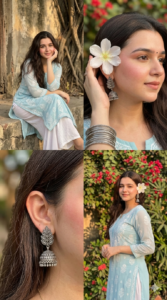
Create an ultra-realistic 4-panel vertical collage (2×2 grid)of a young South Asian woman wearing a soft pastel blue traditional kurta (fabric is lightweight, sheer georgette/chiffon with a graceful fall) with white patterns and white palazzo pants. The collage should feel natural, candid, and aesthetic like a Pinterest editorial shoot, Maintain the same face identity across all panels. She has long dark hair, loosely wavy with a few sleek strands falling across the front. Makeup is soft and glowy with prominent rosy blush and matching nude lips.Add a very small black bindi on her forehead.add a bunch of silver bangles on her hand. Panel details: Top-left: The woman sitting on a low concrete ledge near an old textured wall and tree roots, resting her chin on her hand, soft smile, relaxed pose. Natural outdoor lighting, earthy tones, Top-right:Close-up of her ear and hair with a white flower (The flower has thin, slightly translucent petals with a natural soft texture and a pale yellow center with fine stamens)tucked behind her ear, wearing oxidized silver jhumka earrings. Soft background with red flowers and greenery, shallow depth of field. Bottom-left: Extreme close-up of a different silver jhumka earring with leaf design, focus on hair texture and jewelry detail, soft bokeh background.Bottom-right: Haif-body portrait of the woman standing, slightly turned, smiling gently, same outfit and white flower (The flower has thin, silightly translucent petals with a natural soft texture and a pale yellow center with fine stamens) in hair, background filled with red flowering plants, Style & mood: Warm natural sunlight, soft shadows Earthy and pastel color palette (beige, green, soft blue, red flowers) cinematic depth of field, DSLR quality Skin tones natural, no over-smoothing Hair soft, slightly wavy, natural shine Subtle butterfly overlay element in the center (optional aesthetic touch) Technical:Aspect ratio: 9:16 (vertical) Ultra-realistic, high resolution, sharp focus No distortion, no Al-art look, must feel like real photography. Add some sunlight on her face.
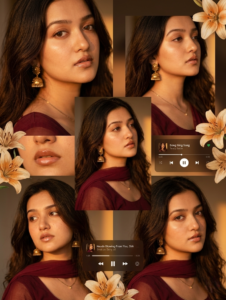
A warm-toned cinematic portrait collage of a young woman with soft glowing skin, subtle freckles, and glossy nude lips. She has long dark brown hair styled in loose waves with face-framing strands. She is wearing traditional gold jhumka earrings and a delicate necklace, dressed in a deep maroon outfit with a sheer dupatta around the neck. The lighting is golden-hour inspired with rich amber highlights and soft shadows, creating a cozy, intimate mood.The composition is a collage layout with multiple cropped frames of her face—close-ups of eyes, lips, and side profile-arranged aesthetically. Add soft floral elements like beige and orange lilies placed around the frame. Include a blurred music player overlay showing a song playing for a nostalgic vibe. Skin appears dewy and radiant, with minimal elegant makeup. Style: soft glam, editorial, aesthetic Instagram collage, warm color grading, high detail, shallow depth of field, cinematic lighting, 4K, ultra-realistic.
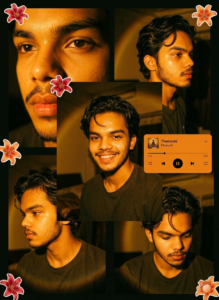
Ultra-realistic cinematic collage of a young Man using the uploaded face exactly. The image is composed of multiple rectangular photo panels layered vertically and diagonally, creating a scrapbook-style layout. Each panel shows close-up and mid-shot portraits of the same girl in a dim indoor room. Lighting: strong, warm, golden-orange direct flash lighting hitting the face from the front-left, creating high contrast, deep shadows, and a glowing skin effect. Background remains dark with visible window curtains slightly illuminated. Harsh highlights on cheekbones, nose, and lips. Slight film grain and soft blur for a dreamy vintage feel. Color grading: intense amber, burnt orange, and golden emozhi tones dominating the entire image. High saturation, slightly crushed blacks, and glowing highlights. Subject styling: messy back hair, glossy lips, dewy skin. Wearing a casual tee. Composition details: Top panel: serious expression, looking directly at 11 camera. Middle panel: cropped lips and necklace close-up. Bottom left: extreme close-up of eyes with strong shadow split across face. Bottom right: angled portrait with soft side gaze. Panels overlap slightly with uneven spacing for aesthetic collage look. Overlay elements: Add realistic flower stickers (lilies in orange, cream, and red tones) placed around the collage. Add a music player Ul card in the center-left area with a soft rounded design. Music player text: Title: "Themozhi" Artist: "Dhanush" Include minimal playback bar and icons (play/pause, skip). Final touches: Slight glow/bloom effect on highlights Subtle vignette around edges Flash photography look, like taken on a digital camera at night Maintain natural skin texture, avoid over-smoothing.
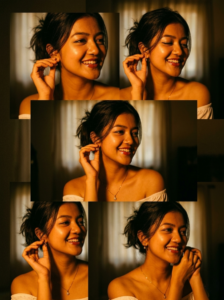
Ultra-realistic cinematic collage of a young woman using the uploaded face exactly. The image is composed of multiple rectangular photo panels layered vertically and diagonally, creating a scrapbook-style layout. Each panel shows close-up and mid-shot portraits of the same girl in a dim indoor room. Lighting: strong, warm, golden-orange direct flash lighting hitting the face from the front-left, creating high contrast, deep shadows, and a glowing skin effect. Background remains dark with visible window curtains slightly illuminated. Harsh highlights on cheekbones, nose, and lips. Slight film grain and soft blur for a dreamy vintage feel. Color grading: intense amber, burnt orange, and golden tones dominating the entire image. High saturation, slightly crushed blacks, and glowing highlights. Subject styling: messy tied-back hair with loose strands falling on face, glossy lips, subtle eyeliner, dewy skin. Wearing a delicate necklace with small pendants and a casual off-shoulder white top. Composition de.
How To Use Cinematic Ai Photo Editing Google Gemini Prompts 2026
Friends, to create this cinematic AI photo, first click on the Create button given above. After this, read all the steps given carefully and follow them one by one. If you do not know how to use it, then there is no need to worry, just read this entire paragraph carefully. I’ve explained each step in simple language, so don’t skip any. When you follow all the steps correctly, you will be able to edit your photos very easily and professionally.
How To Create Image With Cinematic Ai Photo Editing Prompts
Look friends, to create such images you can use any AI tool like ChatGPT or Google Gemini. Both of these tools are quite popular today, and you may already be familiar with these AI tools. These methods can easily yield excellent results. Friends, let’s understand this step by step. First, copy any of the image prompts provided in this article. Then, open the ChatGPT app or its website. Now paste that prompt into the box provided. And upload your photo by clicking the plus icon. Then tap the Generate button. Your image will be ready in no time.
Conclusion
Friends, now you can also edit this cinematic and viral style photo editing very easily. Do try this trend once because nowadays similar pictures are being liked a lot on social media. I have explained the entire process to you in simple and easy language. So just follow all the steps carefully and create your amazing photo without any special editing skills. We hope you enjoyed this editing style. If you’d like more trending photo editing tips, check out: So keep visiting our website where you will find new creative editing ideas like this.